
How To Download And Install KhelFy TV on Android Phone
Welcome to the official installation guide of KhelFy TV.
Thank you for choosing KhelFy TV a lightweight and user-friendly sports companion app. This guide will help you install the app safely on your Android phone, Smart TV, Firestick, and Windows PC.
The entire process is very simple and usually takes less than 2 minutes.
1. How To Install KhelFy TV on Android Phone
Step 1: Visit khelfytv.app and download the latest APK.
Step 2: Go to Settings → Security → Install unknown apps and enable it.
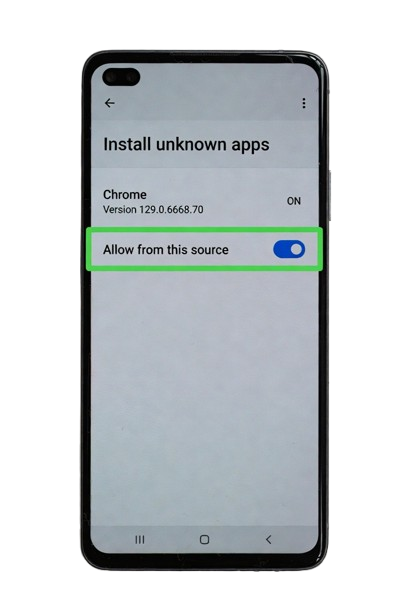
Step 3: Open the downloaded APK file and tap Install.
Step 4: Open the app and allow notifications.
2. How To Install KhelFy TV on Smart TV / Firestick
- Download the APK on your mobile phone
- Copy the APK to a USB drive
- Insert USB into your Smart TV or Firestick
- Open File Manager → Install the APK
- Launch the app
3. How To Run KhelFy TV on PC / Windows Laptop
You can easily use KhelFy TV on your Windows PC using free Android emulators:
Recommended Method (LD Player):
- Download and install LD Player from its official website
- Open LD Player and sign in with Google account
- Drag and drop the downloaded KhelFy TV APK file into LD Player
- The app will install automatically
- Open KhelFy TV and enjoy on big screen
Other Popular Emulators:
Tip: LD Player is fast and uses less computer resources.
Safety Tips
- Always download APK from official website khelfytv.app
- All files are virus free and safe
- Tap “Install Anyway” if Google shows any warning
- Disable Unknown Sources after installation
Conclusion
KhelFy TV is very easy to install on Android phones, Smart TVs, and Windows PCs. Now you can enjoy match schedules, scores, highlights and sports news on any device you want.
Need Help? Contact us anytime through the website.